A camera robot can move through the same path at the same speed, take the same shot again, and leave the operator outside the frame. That changes what a film crew can show when a human camera operator can't safely hold the position or repeat the move.
- A robot arm controls camera position, speed, and timing.
- Repeated motion lets editors cut between matching takes.
- Safety, payload, and setup time still limit the shot.
The camera follows a programmed path
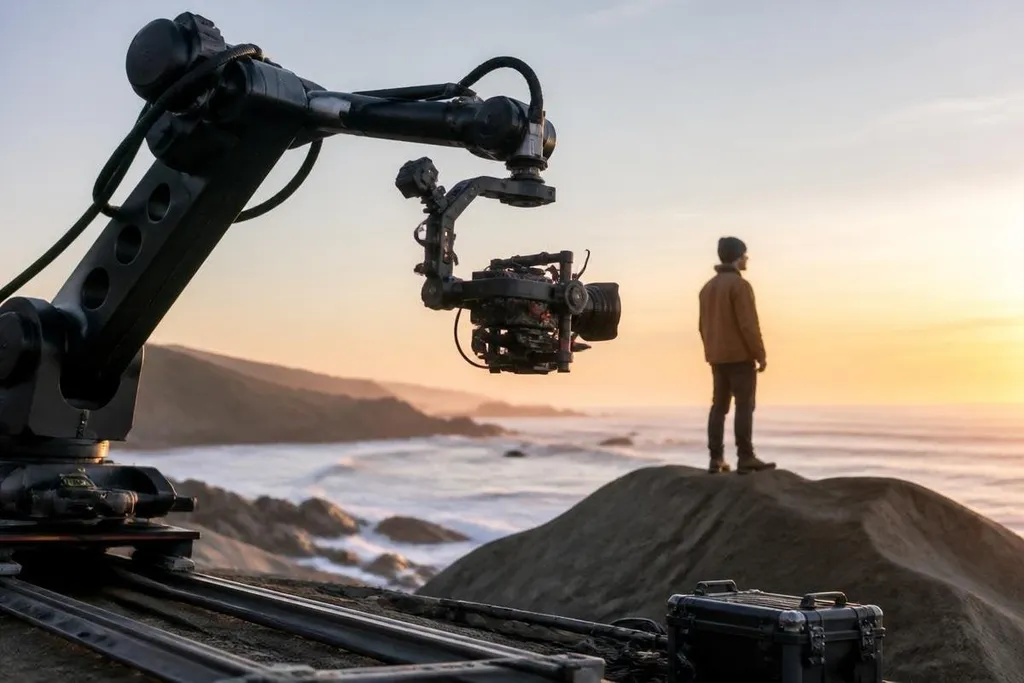
A robotic camera system starts with a path. The operator records points in space, then sets how the arm moves between them. The camera may rise, turn, tilt, or travel around a subject while the robot keeps the lens pointed at the chosen target.
A six-axis arm has six movable joints. Each joint adds another part of the camera move, so the system can change height, angle, and direction without moving the whole base. The controller turns that path into joint movements, then sends commands to the motors.
The useful part is repeatability. A person can repeat a move, but small changes in speed, position, and timing will alter the shot. The robot can run the same programmed move again after a take fails, which gives the editor matching footage instead of a close copy.
Why the shots look difficult
Some camera moves seem impossible because the camera travels close to an object while the view changes at the same time. A robot can carry the camera through a narrow route, keep its joints clear of the set, and pause at a chosen point before continuing.
The system can also combine movement with camera control. The arm may move forward while the camera pans across a subject, then tilts upward as the subject leaves the center of the frame. Those actions happen through one timed program rather than several operators trying to match each other by hand.
A moving camera still needs a stable image. A gimbal holds the camera and reduces unwanted rotation, while the robot controls the larger path. The two systems have separate jobs: the arm moves the camera through space, and the gimbal keeps the image level.
Timing matters as much as movement
A shot only works if the camera move matches the action. The robot can trigger a camera, light, turntable, or practical effect at a set point in the path. That timing lets a crew repeat the same motion around an actor, product, or moving object.
The shot can also be slowed down or sped up through the motion program. A slow arm move gives the camera more time to pass a subject. A faster move creates a sharper change in position, but it also raises the load on the motors and the risk of motion blur.
The camera’s path still has to fit the arm’s reach, payload, and stopping distance. Robot24.com reports on camera robots can connect those limits to the shot and its test date, leading into what the hardware can’t do.
The limits are physical
A robot doesn't remove the need for a camera crew. The arm has a rated payload, and that payload includes the camera, lens, gimbal, cables, and any mounting hardware. A larger cinema setup may need a larger arm, which can bring more weight, floor space, and setup work.
The arm also needs a clear route. A programmed path can still hit a light stand, cable, wall, or person if the set changes after the move is recorded.
Crews need to check the full path at low speed before running the shot at its planned speed. There is another limit: the robot only repeats the instructions it receives. It won't understand that a reflection ruins the image or that a performer moved into the camera's path. A human still checks the frame, the set, and the result.
A practical shot checklist
Use these checks before a robot camera move:
- List the load. Add the camera, lens, gimbal, cables, and mount before checking the arm's payload.
- Record the path. Mark the start point, end point, camera height, and any stops.
- Check clear space. Walk the full route and remove objects that could enter the arm's reach.
- Run slowly first. Watch the joints, cables, and camera while the robot moves at low speed.
- Match the action. Set the camera trigger and any stage effects against the same timing plan.
- Review the take. Check framing, focus, motion blur, and reflections before repeating the shot.
I'd use a robot camera system when the shot depends on repeatable motion, not because the robot makes every image better. The useful change is control: the crew can plan a camera path that stays consistent across takes, then spend its time on the parts a robot still can't judge.